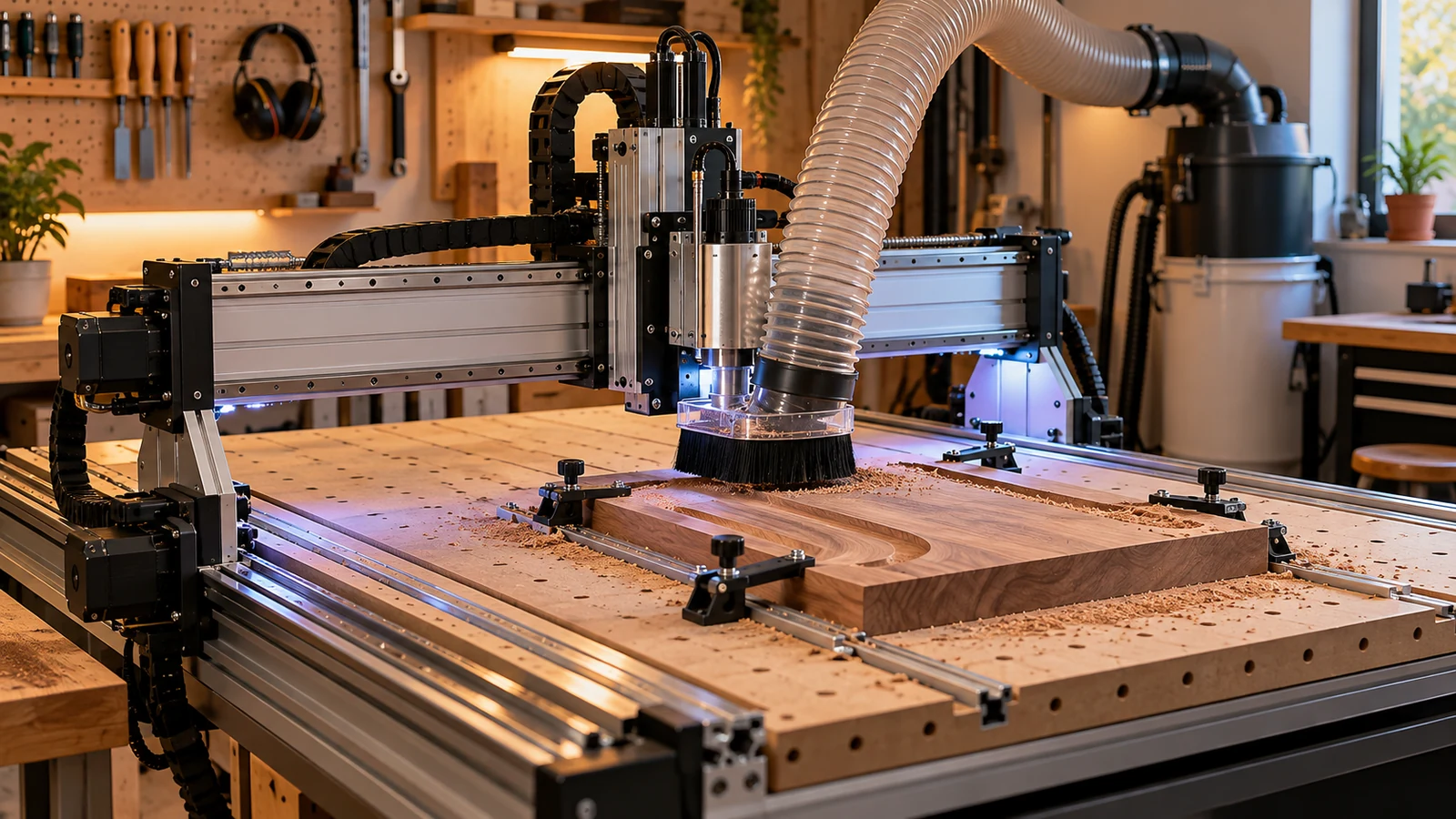
Desktop CNC purchases should be evaluated as complete systems: machine, table, dust, workholding, tooling, computer, control and material flow.
CNCGuide.co treats this as a system decision rather than a product-page contest. A machine can be mechanically excellent and still produce poor work if the cutter, workholding, control, dust strategy, offsets or measurement workflow do not agree. This guide focuses on best first accessories for a desktop cnc router inside that complete chain.
Compare exact dimensions, interfaces, included hardware and seller terms. A marketplace listing is not a compatibility check.
Start with the production requirement
The best first accessories close gaps in the production system: holding the work, cutting it, measuring it, controlling dust and recovering from ordinary wear.
Write down the part material, largest and smallest feature, required finish, machine model, controller, spindle or router, current workholding and tolerance target. Then identify the problem this purchase must solve. That small exercise prevents a common CNC failure mode: upgrading a visible component while the real constraint remains rigidity, workholding, toolpath, electrical integration or measurement.
Three realistic use cases
First-Week Setup
For first-week setup, prioritize workholding and tooling basics. Write down the requirement before opening marketplace tabs. That forces the purchase to answer a production need instead of a feature-list temptation.
Wood-Focused Routing
For wood-focused routing, prioritize tooling basics and dust collection. Write down the requirement before opening marketplace tabs. That forces the purchase to answer a production need instead of a feature-list temptation.
Mixed-Material Experimentation
For mixed-material experimentation, prioritize dust collection and measuring tools. Write down the requirement before opening marketplace tabs. That forces the purchase to answer a production need instead of a feature-list temptation.
Five criteria that actually change the decision
Workholding
For workholding, record the known value or requirement from the machine, toolpath, fixture or control. Then compare only products that state a compatible range, dimension or interface. Do not infer critical fit from a product photograph.
Tooling Basics
For tooling basics, record the known value or requirement from the machine, toolpath, fixture or control. Then compare only products that state a compatible range, dimension or interface. Do not infer critical fit from a product photograph.
Dust Collection
For dust collection, record the known value or requirement from the machine, toolpath, fixture or control. Then compare only products that state a compatible range, dimension or interface. Do not infer critical fit from a product photograph.
Measuring Tools
For measuring tools, record the known value or requirement from the machine, toolpath, fixture or control. Then compare only products that state a compatible range, dimension or interface. Do not infer critical fit from a product photograph.
Spares And Consumables
For spares and consumables, record the known value or requirement from the machine, toolpath, fixture or control. Then compare only products that state a compatible range, dimension or interface. Do not infer critical fit from a product photograph.
Compatibility is more than “will it bolt on?”
Physical fit is only the first compatibility layer. CNC accessories can also require firmware support, a specific input voltage, a probe macro, a known collet series, a certain spindle diameter, a minimum bend radius, a dust-hose port, a toolpath strategy or a postprocessor change. Make the compatibility chain explicit before checkout.
When a listing says “universal,” replace that word with dimensions. Measure the mount, tool shank, plate thickness, connector, hose, slot, thread or wiring requirement yourself. If the listing cannot answer the dimension that matters, move on instead of planning to improvise around an unknown.
Machine rigidity sets the ceiling
Tooling recommendations never exist independently of the machine. Carbide 3D's published feeds-and-speeds material explicitly notes that routers with different rigidity have different practical feed and speed limits. A cutter that works aggressively on a rigid machine may need a more conservative engagement on a lighter frame.
That same logic applies beyond cutting data. A heavier spindle can reduce acceleration or expose gantry flex. A wider surfacing bit can make tram error obvious. A powerful vacuum can collapse a poorly designed hose. A stronger clamp can distort a thin workpiece. Improvements should raise the capability of the complete system rather than move the failure point.
Compare exact dimensions, interfaces, included hardware and seller terms. A marketplace listing is not a compatibility check.
Workholding and tool clearance
Before running a new accessory, model the whole physical envelope. Include clamp bodies, screw heads, probe pucks, dust shoes, hose loops, spindle nose, tool stickout and the maximum programmed depth. Many CNC crashes are not mysterious control failures; they are ordinary collisions between something the toolpath knew about and something the setup sheet forgot.
Use low-profile hardware where appropriate and keep a visual map of no-go zones. When repeating a fixture, record its datum and fastening pattern so the next setup does not depend on memory.
Electrical and control implications
Anything involving controller boards, probes, spindle commands, VFDs, stepper drives or emergency stops deserves its own wiring plan. Control cabinets and mains-powered equipment contain hazardous energy. Manufacturer documentation and qualified electrical work take priority over generic internet diagrams.
Separate the logical question from the power question. A controller may have a probe input without being able to power a sensor directly. A spindle-speed output may be a low-voltage command signal rather than motor power. An emergency-stop input may stop commanded motion but still require a separate strategy for removing hazardous power. Document what each signal actually does.
Dust, chips, cooling and contamination
Wood and MDF create fine dust that can enter bearings, rails and electronics. Aluminum creates chips that can be recut or packed into pockets. Liquid cooling introduces pumps, hoses and leak risk. Air blast adds hoses and potentially airborne debris. Every material-removal accessory changes what must be captured, cleared or cooled.
Carbide 3D's current setup guidance treats vacuum collection as part of basic CNC-router preparation, not an optional cosmetic upgrade. That is the right mental model: dust and chip control are production-system components because they affect reliability, visibility, cleanup and tool life.
Marketplace red flags
- The seller uses “universal” without dimensions or a fit list.
- A kit combines several parts but does not identify the interface standard for each part.
- The listing promises dramatic accuracy gains without addressing machine rigidity, runout, workholding or calibration.
- Electrical accessories omit voltage, current, connector or contact information.
- Photos show a configuration that would interfere with clamps, cable travel, dust collection or emergency access.
Used parts and upgrade economics
Used CNC accessories can be excellent value, particularly fixtures, quality collets, metrology hardware, motors and mechanical components with long service lives. But price the missing pieces. A cheap spindle without its correct VFD, a probe without its cable, a fixture plate without clamps or a controller without documentation can become the most expensive version of the purchase.
Inspect wear where precision is created: collet tapers, bearing feel, threads, connector pins, probe faces, cable strain relief, guide surfaces and mounting holes. Save model numbers and firmware or board revisions before buying replacement parts.
Price the whole working system
Do not compare headline prices alone. Add adapters, clamps, collets, cabling, dust fittings, power supplies, coolant hardware, replacement consumables and the time needed to configure the control or CAM workflow. CNCGuide's broader site philosophy applies here: the useful machine is the complete production system, not one impressive component.
Also ask whether the purchase is reversible. Common standards and replaceable wear parts preserve options when the router, spindle or controller changes later. Proprietary parts can still be worth buying, but the lock-in should solve a concrete problem.
Purchase worksheet
Worksheet: Workholding
Separate a hard requirement from a preference. Write the current value, the required value, and the listing's stated value for workholding. If one column is blank, the purchase decision is not finished. This is especially important for shank sizes, collet series, spindle diameters, voltage, controller inputs, hose ports, plate thickness and mounting geometry.
Worksheet: Tooling Basics
Separate a hard requirement from a preference. Write the current value, the required value, and the listing's stated value for tooling basics. If one column is blank, the purchase decision is not finished. This is especially important for shank sizes, collet series, spindle diameters, voltage, controller inputs, hose ports, plate thickness and mounting geometry.
Worksheet: Dust Collection
Separate a hard requirement from a preference. Write the current value, the required value, and the listing's stated value for dust collection. If one column is blank, the purchase decision is not finished. This is especially important for shank sizes, collet series, spindle diameters, voltage, controller inputs, hose ports, plate thickness and mounting geometry.
Worksheet: Measuring Tools
Separate a hard requirement from a preference. Write the current value, the required value, and the listing's stated value for measuring tools. If one column is blank, the purchase decision is not finished. This is especially important for shank sizes, collet series, spindle diameters, voltage, controller inputs, hose ports, plate thickness and mounting geometry.
Worksheet: Spares And Consumables
Separate a hard requirement from a preference. Write the current value, the required value, and the listing's stated value for spares and consumables. If one column is blank, the purchase decision is not finished. This is especially important for shank sizes, collet series, spindle diameters, voltage, controller inputs, hose ports, plate thickness and mounting geometry.
Related CNCGuide resources
Frequently asked questions
What should I check first for best first accessories for a desktop cnc router?
Start with workholding. If that hard requirement does not match, the remaining features do not rescue the product.
Should I buy the biggest or most powerful option?
Not automatically. Extra mass, diameter, electrical load or complexity can make a small CNC perform worse if the machine cannot use it.
Are Amazon and eBay listings enough to verify CNC compatibility?
No. Use them to compare inventory and seller details, then verify critical dimensions and interfaces against machine or component documentation.
Can an accessory improve accuracy?
Sometimes, but only when it removes a real source of error. Rigidity, runout, alignment, workholding, toolpath and measurement still control the complete result.
Is used CNC tooling or hardware worth considering?
Often yes. Inspect wear surfaces, bearings, connectors, collets, threads, cables and missing proprietary hardware before pricing the deal.
Why does CNCGuide avoid one permanent 'best' product?
The correct choice depends on machine geometry, controller, material, work envelope, tooling system and production goal. Those variables change the decision.
Compare exact dimensions, interfaces, included hardware and seller terms. A marketplace listing is not a compatibility check.
Technical references
Manufacturer and project documentation is used for interfaces and system behavior, not as an independent product ranking.